

If Classic Outlook suddenly replaces characters like é, ü, ñ, ® or £ with question marks, it looks like a font issue at first—but it usually isn’t. In most real cases, it’s a character encoding problem triggered by a recent Outlook update.
Microsoft lists this as a known issue and reports it mainly in Version 2601 (Build 19628.20150 and later). The current status is still “investigating”.
What’s actually happening?
When Outlook sends an email, it needs to choose an outgoing encoding. If it doesn’t reliably use Unicode/UTF-8 and instead falls back to a limited encoding, characters outside ASCII can’t be represented correctly. That’s when “Grüsse, Zürich®” can end up as “Gr??e, Z?rich?” for the recipient.
Fastest workaround: OWA or New Outlook
If you need a quick, reliable fix right now, switch temporarily to Outlook on the web (OWA) or the New Outlook. The issue typically doesn’t show there because the handling is more modern and consistently Unicode-based.
Classic Outlook workaround: force UTF-8 / avoid auto-encoding
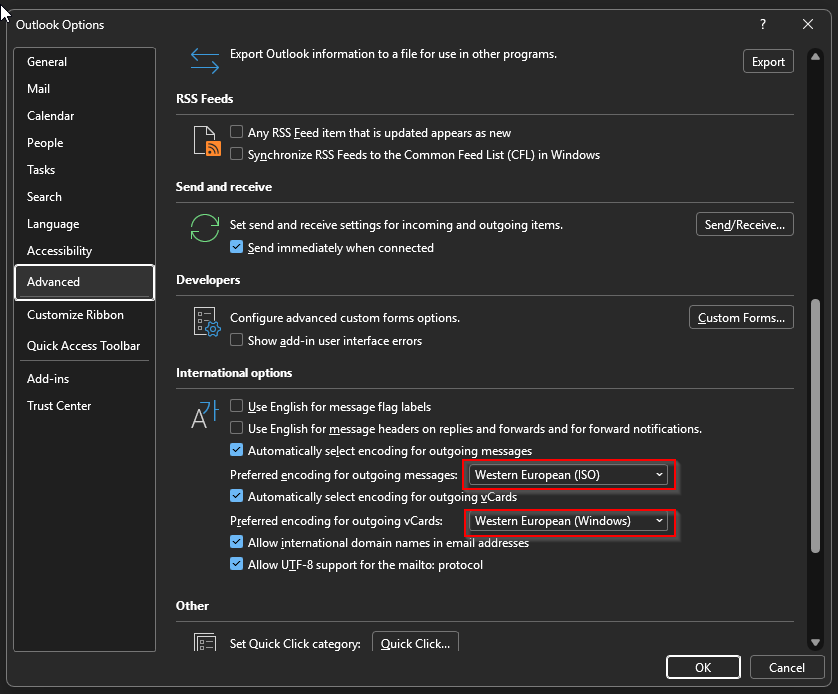
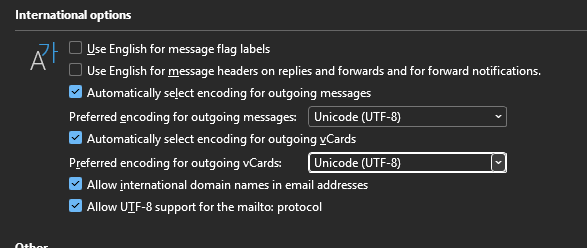
If you must stay on Classic Outlook, a common fix is to disable the automatic selection of outgoing encoding and use a stable encoding instead. In practice, UTF-8 is the most reliable choice because it cleanly supports special characters and is the modern standard. This prevents Outlook from “guessing” and damaging characters during sending.
Rollback option if you need stability
If the problem started right after an update, you can roll back to a previous working version as a temporary stabilization step. Microsoft describes the rollback via officec2rclient.exe, and then recommends pausing updates to avoid jumping back onto the problematic build.
When to expect a real fix
The Microsoft article uses March 10 as a reminder date to re-enable settings or updates. Realistically, that suggests a proper fix will land around the next patch cycle—so roughly the March 10 Patch Tuesday window.
Source
Microsoft Support (Known Issue): Classic Outlook replaces accented and extended characters with question marks